Design a Shed Online: A Tour of the shedd.ae 3D Planner
See how the shedd.ae 3D shed planner turns your idea into a realistic model, measured drawings, an optimised cut list, a build guide and a full bill of materials.
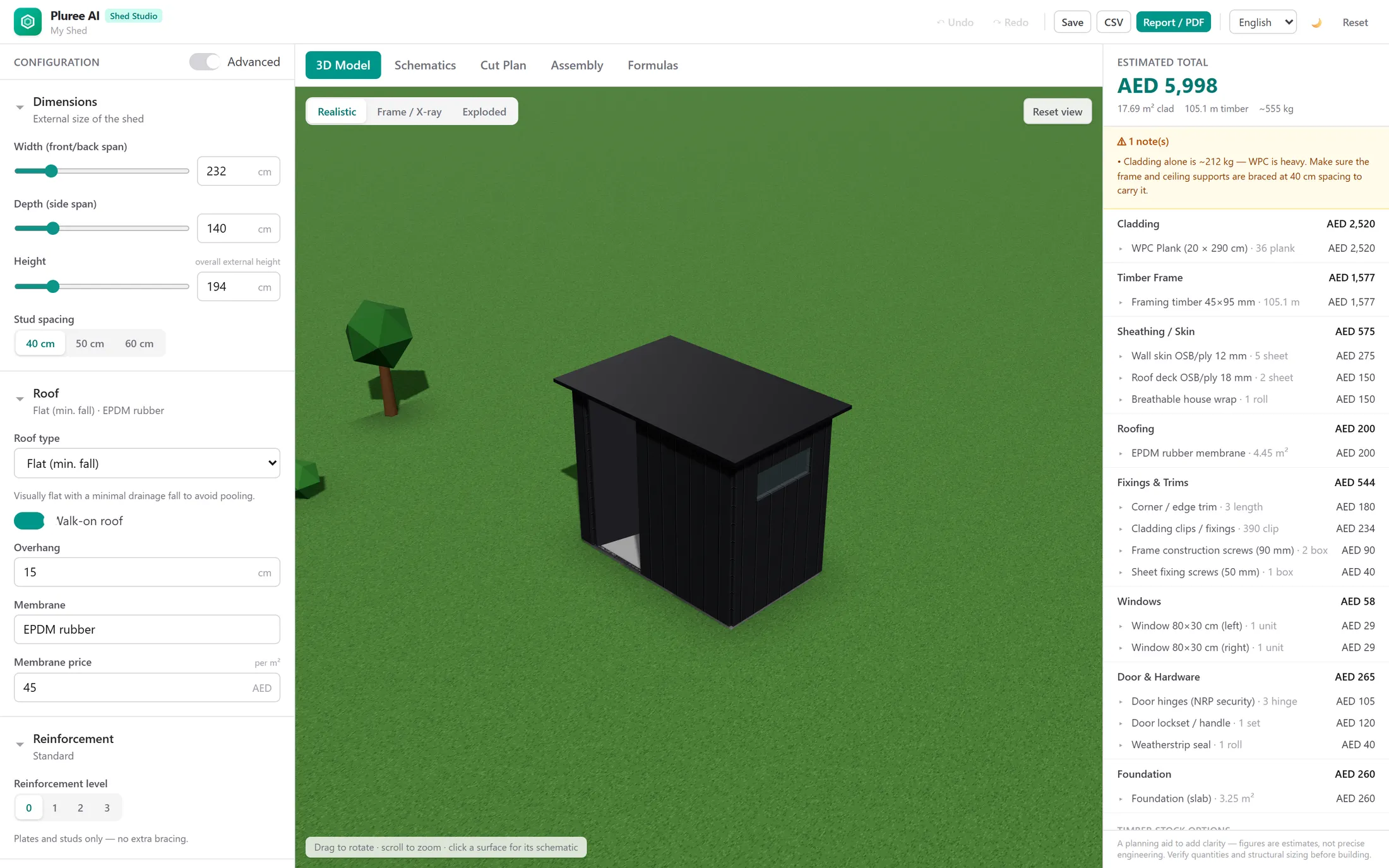
A good shed starts with a good plan. The shedd.ae planner — Shed Studio — lets you design your shed in your browser, in full 3D, and turn that design into everything you need to actually build it: measured drawings, a cutting list, a step-by-step build guide and a costed bill of materials.
You do not need any CAD experience. You drag a few sliders, choose your roof, doors, windows and cladding, and the model — along with every drawing and number behind it — updates as you go. Here is a walk-through of what each part of the tool does, and how it takes you from a rough idea to a buildable plan.
Design your shed in 3D
The planner opens on a live 3D model of your shed. Set the width, depth and height, pick a roof style, and add doors and windows where you want them. Orbit around the model to check proportions and sight lines before you commit to anything.
- Adjust external dimensions and stud spacing with simple sliders.
- Choose roof types such as flat, lean-to or skillion, with overhang and membrane options.
- Place doors and windows on any wall, and set their size and position.
- Pick cladding and finishes per surface to suit your site and budget.
See every part before you cut a thing
Two views turn the model into something you can reason about as a builder. The exploded view separates every panel, stud and fixing so you can see exactly what goes into the build. The frame, or X-ray, view strips away the cladding to show the structural skeleton — the studs, the plates, and the spacing between them.
This is the moment a design stops being a picture and becomes a structure you understand.
Measured schematics and an optimised cut list
Switch to the schematics tab for measured elevations of every wall, with door and window positions drawn to scale. These are the drawings you actually work from on site.
The cut plan goes a step further. It takes every piece of timber your design needs and arranges them against your chosen stock length, so you buy the right amount and waste as little as possible.
- Per-wall elevations with real dimensions.
- A timber cutting list grouped by part.
- Offcut-aware optimisation based on your stock length.
- Sheet goods, cladding and fixings counted for you.
A step-by-step build guide
Every design also produces a numbered assembly guide. It walks you through the build in order — square the base, cut the framing timber, frame each wall, then sheath, clad and roof — so you are never guessing what comes next. It is the difference between a pile of timber and a clear afternoon's work.
Transparent costing, with no black boxes
As you design, a live bill of materials and a running total update beside the model. Open the formulas view and you can see exactly how every quantity and figure is derived — there are no hidden assumptions and no surprises.
That means you can budget honestly before you buy a single board, and adjust the design the moment a choice pushes the cost up. Swap a cladding, shorten a wall, or change the roof, and watch the total respond in real time.
From a plan to a finished shed
When your design is ready, you can export the full bundle — drawings, cut list, assembly guide and bill of materials — and build it yourself or hand it to a contractor. If you are in the UAE, you can also submit the design and ask our team to review it and evaluate building it for you.
Either way, you start from the same place: a shed you have designed, understood and costed before any timber is cut.
Frequently asked questions
Can I design a shed online for free?
Yes. Designing and exploring your shed in the shedd.ae planner is free — set the dimensions, roof, doors, windows and cladding and the 3D model updates instantly. You only spend tokens when you export the full plan bundle (drawings, cut list and bill of materials).
Does the planner produce a materials list and a cut list?
It does. Every design generates a live bill of materials and an optimised cutting plan that arranges your timber against your stock length to minimise offcuts and waste — so you can price and buy materials with confidence.
Can I get build plans and assembly instructions?
Yes. Alongside measured wall schematics, the planner produces a numbered, step-by-step assembly guide that takes you from squaring the base to fixing the roof.
Can your team build the shed for me?
If you are in the UAE, you can submit your design and ask our team to review it and evaluate building it for you. Elsewhere, the exported plans are made to be built by you or your contractor.
Plan your shed with AI
Turn these ideas into real dimensions, a materials list, a cutting plan and assembly steps.
Open the planner